

How to Plan a Trip with ChatGPT Atlas Browser: Unlock AI-Powered Travel in 2026
Updated April 7, 2026
Not too long ago, planning a trip meant wrestling with a dozen browser tabs and jumping between booking sites. Thankfully, there’s a much easier way now.
ChatGPT Atlas browser takes over your trip planning with its Agent Mode—you just describe your dream trip, and it actually books flights and reservations for you. It’s honestly a game-changer for travel planning.
This new AI browser from OpenAI launched in April 2026, and it doesn’t work like anything you’ve tried before. Instead of clicking through endless options, you just tell Atlas what you want in plain English. The browser jumps into action—finding flights, comparing hotels, and even handling bookings while you sit back.
Here’s something most people haven’t realized yet: Atlas remembers your travel style and learns your preferences. Whether you’re planning a quick weekend escape or juggling a complicated multi-city itinerary, knowing how to use this AI tool will save you a ton of time and headaches.
Key Takeaways
- ChatGPT Atlas uses Agent Mode to book flights and hotels automatically when you ask
- The browser remembers your preferences and personalizes future travel ideas
- You can plan entire trips way faster by letting the AI handle research and booking
Table of Contents
- Getting Started with ChatGPT Atlas Browser
- How to Access ChatGPT Atlas
- Setting Up Agent Mode
- Importing Data and Browser Memories
- Leveraging Agent Mode for Seamless Travel Planning
- Automating Flight and Hotel Bookings
- Personalizing Itineraries with AI
- Using the Chat Interface for Trip Research
- Advanced Features: Personalization and Browser Memories
- Utilizing Previous Browsing Data
- Smart Suggestions and Recommendations
- Ensuring Privacy and Security While Using Atlas
- Understanding Privacy Risks with AI Browsers
- Guardrails and Safety Measures
- Tips to Minimize Data Exposure
- Comparing ChatGPT Atlas with Other AI Browsers
- Key Differences from Google Chrome
- Emerging AI Browser Alternatives
- Expert Tips for Effortless Trip Planning with AI Agents
- Maximizing Productivity with Agentic AI
- Staying in Control of Your Travel Experience
- Frequently Asked Questions
- What details should I provide to get a day-by-day itinerary that matches my pace, interests, and budget?
- What prompts help compare neighborhoods and choose the best base for walkability, transit access, and evening safety?
- How do I build a realistic route that accounts for travel times, jet lag, and attraction time slots without overpacking the days?
- What’s the best way to ask for backup options (rain plans, sold-out attractions, strike disruptions) while keeping the itinerary cohesive?
- How can I turn an itinerary into a practical checklist for bookings, documents, maps, and an offline-friendly plan on Android?
- Book Your Dream Experience
- More Travel Guides
Getting Started with ChatGPT Atlas Browser
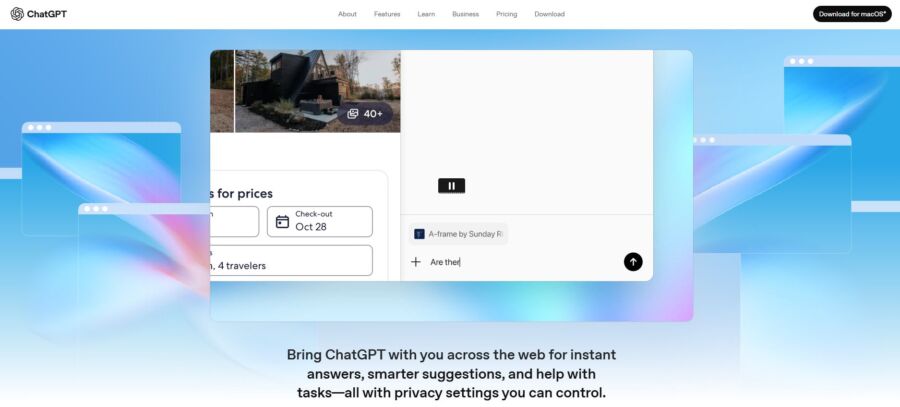
ChatGPT Atlas showed up on macOS in April 2026, putting OpenAI’s AI assistant right inside your browsing routine. You’ll want to download the browser, turn on Agent Mode, and set up your preferences before you start planning trips with AI help.
How to Access ChatGPT Atlas

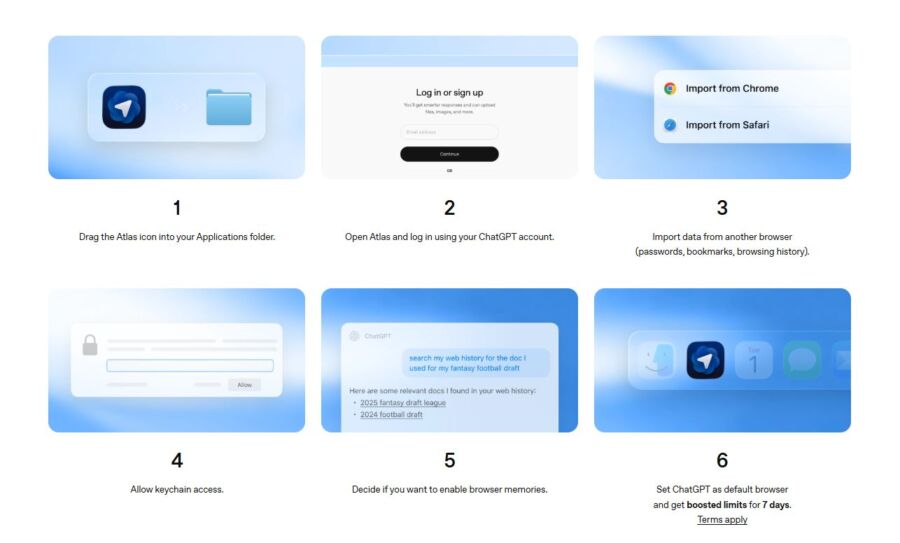
At the moment, ChatGPT Atlas only works for macOS. You can grab it from OpenAI’s website, but Windows, iOS, and Android versions are on the way.
Installing it feels just like downloading Chrome or Safari. Once it’s set up, sign in with your OpenAI account. If you’ve already got ChatGPT, just use those same details.
After logging in, Atlas looks like any other browser at first. But here’s the twist: ChatGPT lives inside your browsing. You can ask questions, get quick page summaries, and let the AI help you navigate travel booking sites—no more bouncing between tabs or apps.
Setting Up Agent Mode
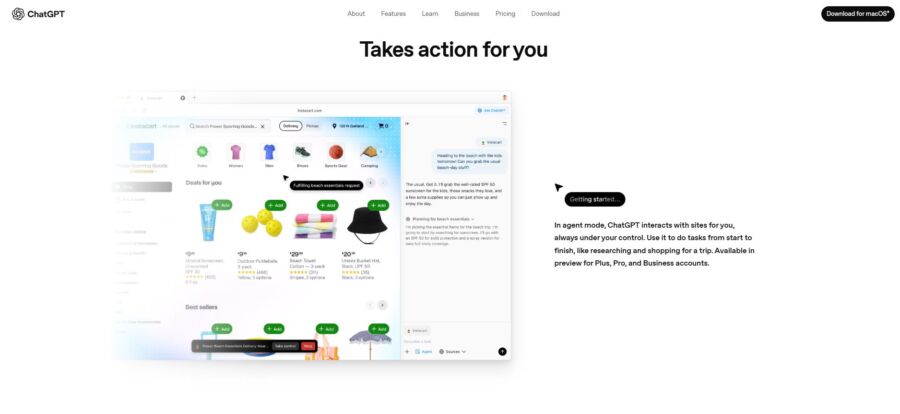
Agent Mode is where the magic happens for trip planning. This feature lets ChatGPT take real actions for you—think of it like a digital assistant that clicks buttons and fills out forms.
To turn on Agent Mode, look for a prompt or toggle in the browser’s interface. Once it’s active, just ask ChatGPT things like “book a flight to Portland for next weekend” or “find hotels near downtown Seattle under $200 per night.” The AI takes over, moving the cursor and clicking through steps to handle it all.
You’ll see everything the agent does in real time. If something looks off, you can step in and stop it. I’d say start with simple requests first—get comfortable before letting it handle anything complicated or multi-step.
Importing Data and Browser Memories

Browser Memories is Atlas’s way of remembering your preferences and past trips. This makes planning feel more personal each time you use it.
When you first launch Atlas, you can import data from your old browser—bookmarks, passwords, browsing history. This helps ChatGPT pick up on your travel habits and preferences right away.
As you use Atlas, it builds memories. If you always search for pet-friendly hotels or love window seats, Atlas notices and remembers. You don’t have to repeat yourself every time you plan a new trip.
You can check and manage these memories in the settings. Delete anything you want gone. It’s worth glancing at this now and then to make sure the AI is actually learning what matters to you.
Leveraging Agent Mode for Seamless Travel Planning
Agent Mode turns ChatGPT Atlas into your own travel assistant. It does the research and booking, all while learning what you like. The AI agent searches, compares options, tracks prices, and builds custom itineraries around your needs.
Automating Flight and Hotel Bookings

AI agents scan tons of booking platforms at once to spot the best deals on flights and hotels. Just give your travel dates, budget, and preferences. The agent searches across dozens of sites in minutes—way faster than doing it yourself.
The AI remembers your previous searches using browser memories. If you checked out beach resorts last week, it’ll show you similar spots for your next tropical trip.
Most AI browsers can’t finish bookings for you yet. But they organize the best options in a neat list with direct links to search flights and hotels or compare rental cars.
The agent lets you know when prices drop for routes you’re watching. Personally, I’ve saved hundreds just by letting the AI monitor fares while I do other things.
Personalizing Itineraries with AI
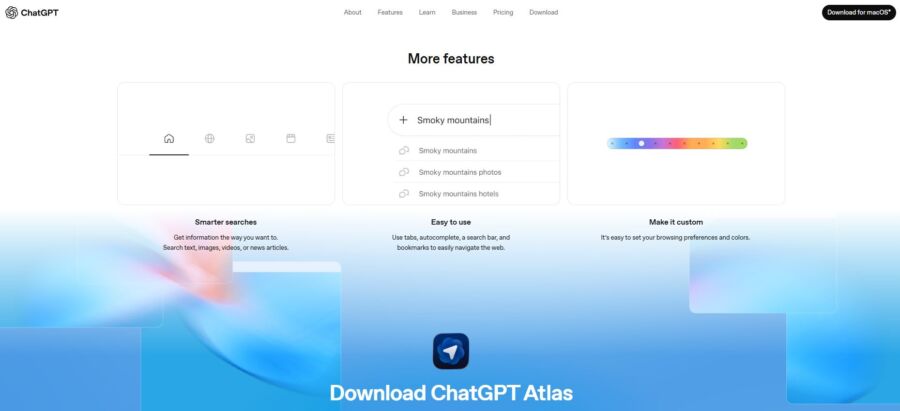
ChatGPT Atlas puts together itineraries that actually match your style—not just generic tourist stops. Tell the AI if you love museums or hiking, fancy dinners or street food, and it tailors recommendations for you.
The system learns from each chat. If you ignore nightclub suggestions but save every coffee shop, future itineraries will lean toward your real interests.
Agent Mode spaces out your activities so you aren’t sprinting across town all day. It accounts for meals, rest, and travel time between places.
Feel free to ask the AI to tweak parts of your itinerary. The agent keeps track of what you’ve already planned, so changes don’t mess up your whole trip structure.
Using the Chat Interface for Trip Research
The chat interface lets you ask follow-up questions and refine searches in a way that feels like chatting with a friend. No need to open a million tabs—just talk to the AI.
You can get super specific info that’s tough to find through regular search. Try asking, “which neighborhoods in Lisbon have great coffee shops near metro stations?” and you’ll get detailed answers from multiple sources.
Because of browser memories, you don’t have to repeat your preferences every time. The AI remembers if you’re vegetarian or traveling with kids, so every suggestion fits your needs.
ChatGPT Atlas can explain local customs, suggest packing lists, and even help with basic phrases in other languages. The AI handles so many parts of trip planning, all in one spot.
See Related: How to Use ChatGPT to Find Cheap Flights: Pro Tactics & Smart Hacks
Advanced Features: Personalization and Browser Memories
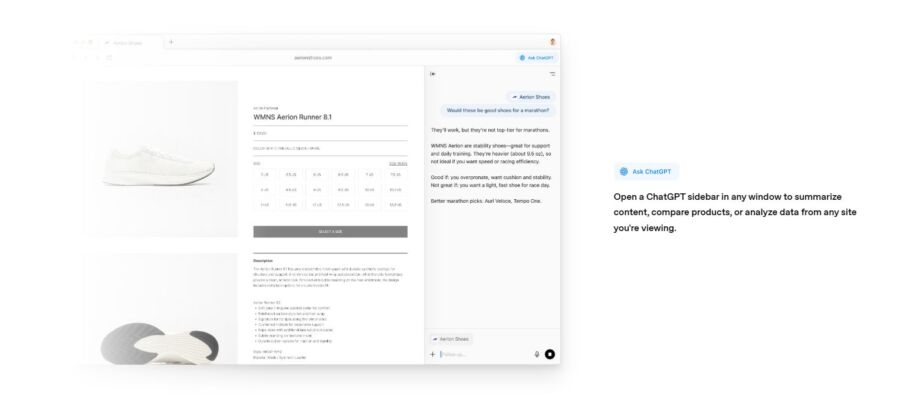
Atlas stands out because it lets ChatGPT remember what you’ve browsed and where you’ve been online. This memory feature works with your browsing data to make planning faster and more personal.
Utilizing Previous Browsing Data
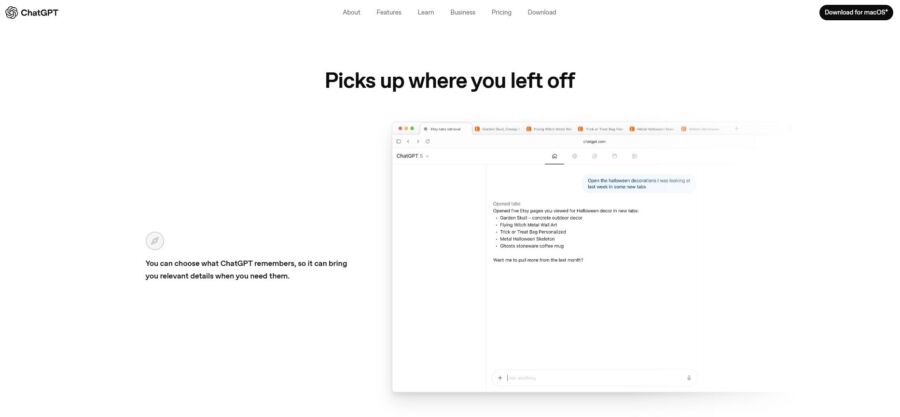
When you turn on browser memories in Atlas, you’re basically letting the AI learn from your habits. It’s like having a travel assistant who’s been quietly taking notes every time you look at destinations, hotels, or activities.
Here’s why that’s so handy: If you spent last week browsing Italian restaurants in Rome and checking out hotels near the Colosseum, Atlas remembers. When you ask for help planning your Rome itinerary later, it already knows what neighborhoods and dining experiences you like.
Atlas’s browser history works differently than the usual browsers. Instead of just saving URLs, ChatGPT understands the context. You can ask, “what was that hotel I looked at last Tuesday with the rooftop terrace?” and Atlas will pull it up—no need to remember the website name.
Smart Suggestions and Recommendations
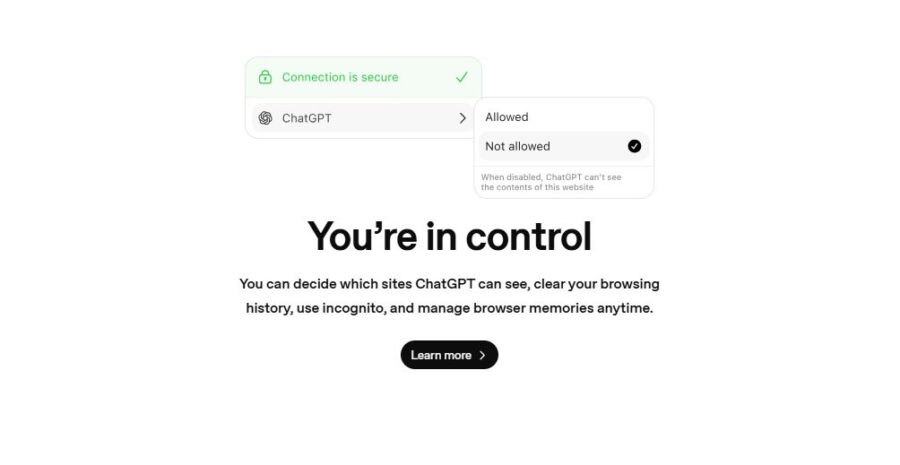
The ChatGPT Atlas browser turns your old browsing into helpful suggestions. If you’ve been researching beach towns, Atlas might suggest packing lists, weather tips, or other coastal destinations you haven’t thought of yet.
This gets really useful when you’re deep in planning. If you’re looking at flights to Barcelona, Atlas can pull up that tapas restaurant you bookmarked months ago or remind you about a museum exhibit you wanted to see. It connects the dots across your browsing history.
Suggestions adapt as your search changes. If you suddenly go from budget hostels to luxury hotels, the atlas browser picks up on that and shifts its recommendations. It’s not always perfect—sometimes it misses the mark—but it learns fast.
Ensuring Privacy and Security While Using Atlas
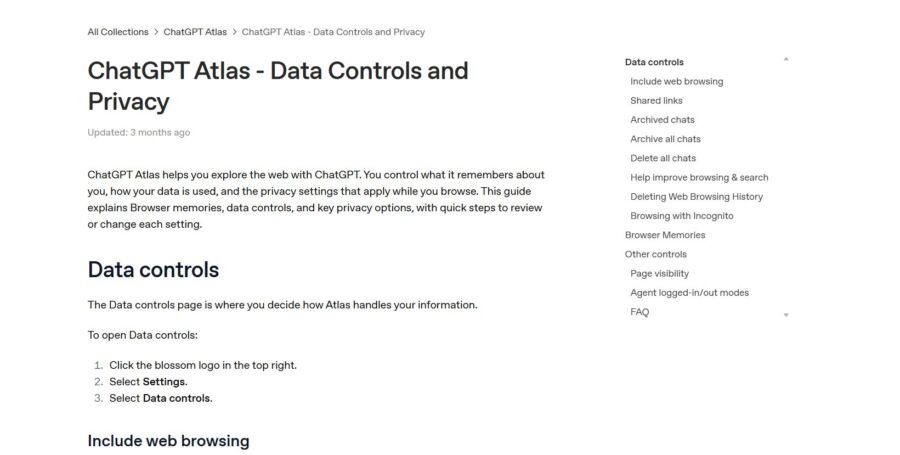
ChatGPT Atlas brings some awesome trip planning features, but it also comes with unique privacy risks that older browsers don’t have. Agent Mode and browser memories make Atlas super helpful, but they also create new ways your personal data could get exposed or misused.
Understanding Privacy Risks with AI Browsers

When you use ChatGPT Atlas, you’re giving an AI system access to your online activity, passwords, and personal info. The biggest risk? Something called prompt injection attacks.
Here’s the deal: hackers hide sneaky instructions on websites that the AI reads but you never see. These could be hidden in white text or buried in code. When Atlas visits these sites, it might follow those hidden commands instead of what you actually asked.
The AI browser could accidentally send your emails to an attacker. It might grab passwords from your accounts or copy sensitive social media messages. One attack even showed Atlas swapping out items on your clipboard for phishing links without you noticing.
What makes this different from regular browser problems? Atlas actively reads content and makes decisions for you. You don’t have to click anything weird—just visiting a compromised page in Agent Mode could set off an attack.
Guardrails and Safety Measures
OpenAI added several protections to Atlas, but prompt injection is still a tough problem. The company ran a lot of tests before launch and trained the AI to ignore sketchy instructions on web pages.
Atlas includes Watch Mode, so you can keep an eye on what the agent does when it visits sensitive sites. There’s also a logged out mode where ChatGPT works without your account details, which limits what info could be stolen.
OpenAI set up rapid response systems to catch attack campaigns quickly and block them. Still, their security officer admitted attackers will keep looking for new ways to break in.
Honestly, it’s a bit of a cat-and-mouse game. New vulnerabilities will pop up as hackers get more creative.
Tips to Minimize Data Exposure

Honestly, unless you really need to, don’t let Atlas access your password keychain. That permission opens the door to everything if someone ever manages to hack the AI agent.
Whenever Atlas deals with your banking, email, or social media, switch on Watch Mode. Seriously, keep an eye on what the browser’s up to instead of just assuming it’s safe. If you spot Atlas copying data or wandering into weird pages, shut it down right away.
Try using logged out mode for casual browsing, and only log in when you want features tailored to you. That way, if something goes sideways, the fallout stays limited.
Be picky about what you import from Chrome. A lot of people breeze through those setup questions and end up sharing way more than they realize. Maybe just bring over the passwords you actually need for trip planning, not your whole digital life.
Whenever you book travel, double-check every reservation or purchase before Atlas finishes the job. AI can make mistakes or get tripped up by prompt injections that send your money to the wrong place.
See Related: Savvy Luggage Handling Hacks That Will Transform Your Travel Experience
Comparing ChatGPT Atlas with Other AI Browsers

ChatGPT Atlas jumps into a busy space where old-school browsers meet new AI tricks, and honestly, it doesn’t play by Chrome’s rules. Google’s not the only rival anymore—AI browsers like Perplexity Comet are changing how you might research and book trips.
Key Differences from Google Chrome
Chrome just gives you search results and makes you click through one page after another. Atlas flips that—summarizes stuff, compares choices, and finishes tasks so you don’t have to keep opening new tabs.
If you’ve ever planned a trip in Chrome, you know the drill: a dozen tabs for hotels, another for flights, and then you lose track of that restaurant you loved. Atlas tries to fix this by doing the juggling and giving you quick summaries right in the browser.
But here’s the thing: Atlas only works on macOS for now. Windows, iOS, and Android? Still waiting. Chrome, of course, just works everywhere. Plus, OpenAI bets big on paid users, so don’t be shocked if some features sit behind a paywall.
Privacy’s a whole other story. Chrome grabs your data for Google’s ads, but AI browsers process your searches through their models. That brings up fresh questions about what happens to your plans and personal info.
Emerging AI Browser Alternatives
If Atlas isn’t your style, you’ve got other AI-powered browsers to try. Perplexity Comet just launched, and Microsoft Edge already has CoPilot Mode for AI help.
Comet does things its own way—some folks like it better for deep research, especially for planning trips. Both browsers are new, though, and still figuring things out.
Microsoft took a safer route. They just added AI to Edge, so you get the same old browser with some new tricks. It feels familiar, just with smarter help on top.
Honestly, all these AI browsers are still working out the kinks. They promise to make life easier, but sometimes it feels like just another search with a few extra steps. Is it worth switching yet? That’s up to you.
Expert Tips for Effortless Trip Planning with AI Agents

AI agents shine when you know how to steer them and when to jump in yourself. The trick is letting the browser handle grunt work, but keeping control over the choices that really matter.
Maximizing Productivity with Agentic AI

Atlas works best if you treat it like a research assistant, not your personal travel agent. Start by asking it to pull up flight options and compare prices across dates. You can tell it to check your browser memories for past trips to similar spots and see what worked before.
Here’s where it gets fun. Instead of just searching for “cheap flights to Paris,” try something like “find flights to Paris in May under $600, prefer morning departures, and cross-check with hotel availability in the 11th arrondissement.” Atlas will juggle tabs, compare, and even autofill booking forms with your saved details.
Use the browser’s memory to save your preferences—seat choices, dietary needs, frequent flyer numbers. Next trip, Atlas remembers so you don’t repeat yourself. This is a lifesaver when you’re comparing tours and activities on different sites.
Staying in Control of Your Travel Experience

Don’t let Atlas book anything final without your okay. It’s great at gathering info and narrowing choices, but you should still check prices, cancellation rules, and the fine print. I’ve seen it miss stuff like baggage fees or hidden resort charges.
Decide what the AI can do on its own. Let it hunt for flight deals and organize tabs, but pause before it fills in payment details. Use contextual search to double-check facts, especially for visas or health stuff.
Keep your browser memories sorted by trip. Create separate contexts for each destination so the AI doesn’t mix things up.
See Related: Game-Changing Hacks for Sleeping on Planes
Frequently Asked Questions

Planning a trip with Atlas means knowing what to share, how to ask for what you want, and turning AI ideas into real plans that actually work.
What details should I provide to get a day-by-day itinerary that matches my pace, interests, and budget?
Start with your travel dates, number of people, and how long you’ll be gone. Then, get specific about what really matters to you.
Skip the generic stuff. Instead of “I like food,” tell Atlas you love street markets or Michelin-starred tasting menus. If you prefer quirky little museums, say so. The more details, the better the results.
Budget matters, but keep it practical. Mention your daily meal budget, whether you’re up for a splurge, and if you’d rather stay central than fancy. Also, let Atlas know your pace—are you a two-activities-a-day person, or do you want to pack in five?
Don’t forget your limits or quirks. If you avoid early mornings, need lots of breaks, or hate walking, say it up front. That way, Atlas builds something you’ll actually enjoy.
What prompts help compare neighborhoods and choose the best base for walkability, transit access, and evening safety?
Ask Atlas to compare neighborhoods based on what you’ll actually do. Instead of “best area to stay,” try “Compare the Latin Quarter and Le Marais for a couple who wants bakery walks, metro access, and streets that feel safe late at night.”
Request walking times to the places you care about. Ask, “How long does it take to walk from Trastevere to the Colosseum versus from Monti?” That’s way better than just reading walkability scores.
Transit access is huge. Ask which neighborhoods are near multiple metro lines or have night buses. Some spots look central but are a pain to reach in practice.
Evening safety is tough to measure. Ask about details like “Which areas have restaurants open past 9 pm?” or “Where do locals go for evening walks?” Busy streets usually feel safer than empty ones.
How do I build a realistic route that accounts for travel times, jet lag, and attraction time slots without overpacking the days?
Tell Atlas when you land and ask for a first-day plan that fits your energy level. If your flight gets in at 6 am, you’ll crash by mid-afternoon no matter how much coffee you drink. Plan for that.
Ask Atlas to add time buffers between activities. Don’t schedule the Louvre from 10 to 12 and lunch across town at 12:30. Build in 30 minutes for transitions, bathroom breaks, and those “let’s just see this one thing” moments.
Be clear about time slots when it matters. Lots of museums now require timed entry. Tell Atlas, “I have Uffizi tickets for 2 pm on Thursday,” and let it build around that instead of treating every plan as flexible.
For multi-city trips, ask about total travel time—not just the train ride. Factor in getting to the station, arriving early for tickets, and getting from the arrival station to your hotel. That “2-hour” train can eat up half your day.
What’s the best way to ask for backup options (rain plans, sold-out attractions, strike disruptions) while keeping the itinerary cohesive?
Ask for weather-proof alternatives for outdoor plans. Try “If the beach day gets rained out, what indoor options are nearby so we don’t have to backtrack?” That keeps your day from getting scattered.
Plan for sold-out spots ahead of time. Ask Atlas, “If Anne Frank House is booked, what similar historical places in Amsterdam don’t need months of advance tickets?” Sometimes the backup ends up being the highlight.
Strikes can mess up travel, especially in places like France or Italy. Ask Atlas about backup transport between cities. Knowing your ferry or bus options before the trains stop running can save your trip.
Instead of random backup activities, create themed backup days. If Museum X closes, having a full “rainy day cultural itinerary” feels way less stressful than scrambling for ideas at the last minute.
How can I turn an itinerary into a practical checklist for bookings, documents, maps, and an offline-friendly plan on Android?
Just ask Atlas to export your itinerary as a checklist based on how urgently you need to book things. Tell it to split up “book now” stuff like museum tickets from “decide later” options like where you might eat. That way, you won’t get stuck stressing over lunch when you still haven’t locked in a place to sleep.
Ask for a document checklist tailored to your destination. Every country wants different paperwork. Atlas can whip up a list with visa info, vaccination docs, travel insurance papers, and booking confirmations.
For maps, have Atlas point out which neighborhoods you’ll spend the most time in and then ask for offline map boundaries. Google Maps lets you grab specific regions, but you need to know which ones matter. Instead of guessing, Atlas might just say, “Download maps for Districts 1, 3, 5, and 7.”
Want your itinerary offline? Tell Atlas to make a day-by-day summary with addresses and simple directions. Throw it into Google Docs or any notes app that works without Wi-Fi. Don’t forget to add hotel and attraction phone numbers—you’ll thank yourself when your data drops out right when you need it most.
Book Your Dream Experience
More Travel Guides
Related Posts