Last modified September 27, 2026
A travel document organizer earns its place by keeping a passport dry, flat and findable. It does not need to block radio waves. The U.S. State Department treats liquid stains, a significant tear, unofficial markings on the data page, torn-out visa pages and a hole punch as damage that requires replacement. A damaged passport cannot be renewed by mail or online: you apply in person on Form DS-11 and pay a $130 application fee plus a $35 facility acceptance fee, and by law neither fee is refundable. RFID blocking, the feature most listings put first, defends a chip that a U.S. passport already shields inside its own cover, and that will not release data until a border reader has optically read the printed page. Buy for waterproofing, rigidity and capacity. Treat RFID blocking as a free extra, never as the reason to choose one.
The short version
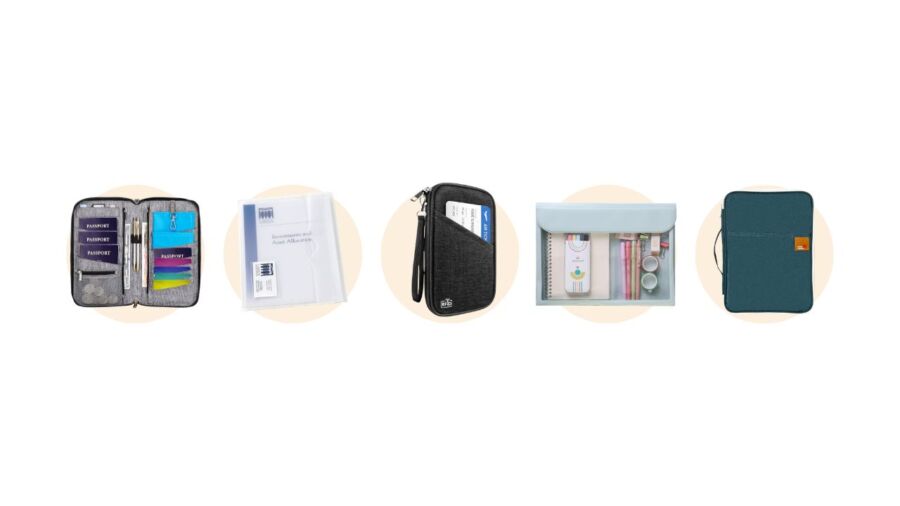
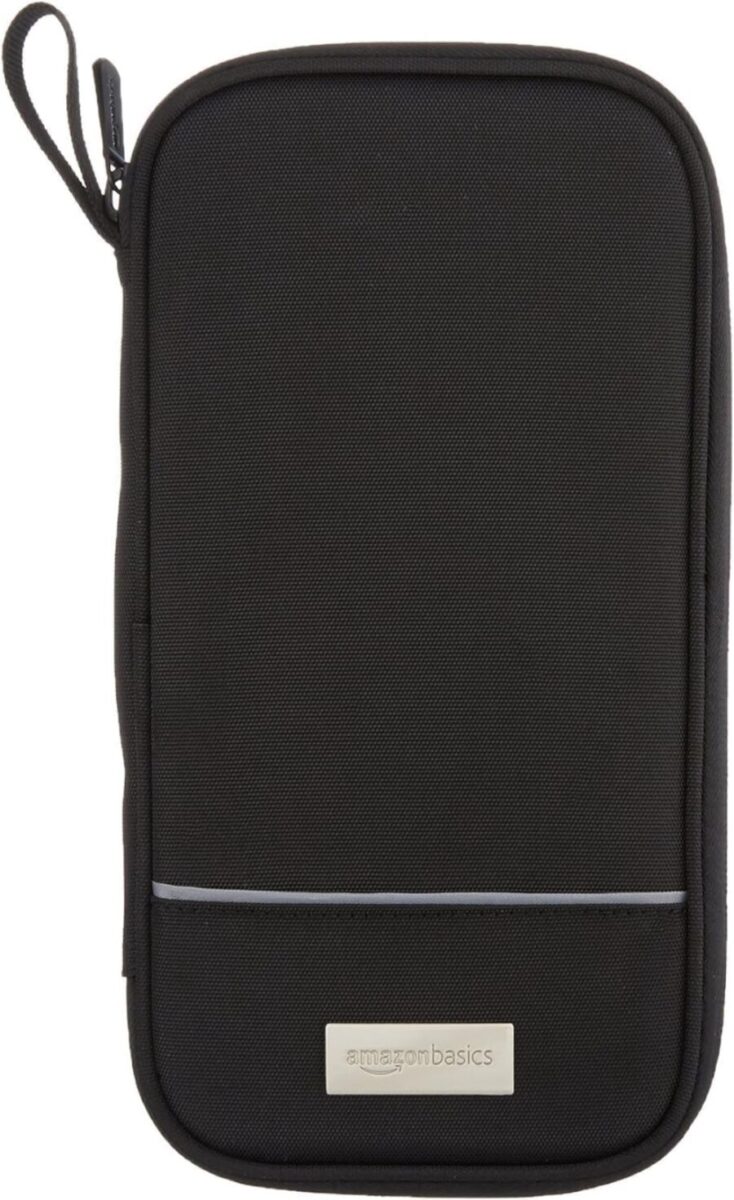
- If you carry one passport: a zip pouch roughly 5 x 9 inches with a water-resistant shell and a rigid back panel. The Amazon Basics nylon travel organizer is the plainest version of this shape.
- If you carry a family’s passports: a six-slot pouch such as the Holifesy family organizer, then split the passports between two adults rather than putting all of them in one pouch.
- If you are carrying visa paperwork, insurance certificates or printed itineraries: that is a different product. You want a letter-size folder such as the 13-pocket expanding file, and you should not try to make one item do both jobs.
- Skip: anything sold mainly on RFID blocking, and any design that asks you to punch or clip something through the passport itself.
What should a travel document organizer actually do?
It has three jobs: keep documents dry, keep the passport flat and unmarked, and let you find the right document at a gate without emptying the bag. Everything else on a product page is either a consequence of those three or is decoration. The table below sets the advertised feature list against the rule or standard that actually governs whether the feature matters.
| Feature | What listings claim | What actually governs it | Verdict |
|---|---|---|---|
| RFID blocking | Stops thieves reading your passport chip | U.S. e-passports carry anti-skimming material in the cover and use Basic Access Control on the chip | Redundant for a U.S. passport, marginal for EMV cards |
| Waterproof or water-resistant shell | Keeps contents dry | State Department counts liquid stains as damage requiring an in-person replacement | The single most valuable feature on the list |
| Rigid or padded back panel | Protects documents | Significant tears and unofficial markings on the data page both count as damage | High value, rarely advertised |
| Neck cord or lanyard | Hands-free access in an airport | No rule, but a hole punched through a passport voids it | Use the pouch’s own ring. Never attach anything to the book |
| Pen loop | Convenience | Arrival and customs forms are still handwritten in many countries | Genuinely useful, costs nothing |
| Pocket count | Better organization | Nothing | Marketing. Six well-placed pockets beat twenty-one |
Do you need RFID blocking in a travel document organizer?
No, not for a U.S. passport, and probably not for your payment cards either. This is the feature most of this product category is sold on, and it is the one with the weakest case behind it.
RFID stands for radio-frequency identification, and the United States has issued electronic passports with a contactless chip since 2006. That chip has two defences built into the document itself. The first is physical: the e-passport specification called for anti-skimming shielding in the cover, so a closed passport cannot be read at all (as reported when the program launched). The second is cryptographic: Basic Access Control means the chip stays silent until the reader supplies data printed inside the book, which requires an officer to open the passport and scan the printed page optically. A blocking sleeve duplicates the first defence and does nothing about the second.
Payment cards are a separate question with a similar answer. Contactless EMV cards transmit a single-use cryptogram for each transaction rather than a static card number, so a captured transmission cannot be replayed. As summarised by ESET, UK Finance does not track wireless skimming because it has not observed the practice at any scale, and contactless fraud runs at about 1.3 pence per 100 pounds spent against 6.0 pence for card fraud overall. Those figures are reported by a security vendor summarising UK Finance data rather than quoted from a UK Finance release, so treat them as indicative of the order of magnitude rather than exact.
| What you are carrying | Chip type | Protection already built in | Does blocking add anything? |
|---|---|---|---|
| U.S. passport book issued 2006 or later | Contactless e-passport chip | Anti-skimming material in the cover plus Basic Access Control | No |
| U.S. passport card | Vicinity RFID, longer read range | Issued with a protective sleeve; carries no name or personal data on the chip | The supplied sleeve is enough |
| Contactless credit or debit card | EMV contactless | One-time cryptogram per transaction, so a captured read cannot be replayed | Very little |
| Older non-U.S. passport | Varies by issuing country | Cover shielding is not universal outside the U.S. program | Possibly, if your book predates local shielding |
| Hotel key card, transit card, office badge | Plain MIFARE or similar | Often none worth the name | Yes, but none of these matter if copied |
The practical conclusion: if two pouches are otherwise equal and one claims RFID blocking, take it, because the lining costs you nothing. Do not pay a premium for it, and do not let it displace waterproofing on your list. That applies equally to an RFID travel wallet sold for one person and to the RFID blocking family travel pouches further down this page: the lining is a bonus on a product you should be choosing on shell, closure and slot count. Listings that lead with RFID travel protection and never state a coating are telling you which of the two they got right.
What counts as passport damage, and what does it cost to fix?
Damage is a defined list, not a judgement call, and the bill starts at $165 for an adult. The State Department counts stains from a liquid, a significant tear, unofficial markings on the data page, missing visa pages and a hole punch. It explicitly does not count ordinary wear such as folded pages or a small bend.
| Condition | Counts as damage? | Why it matters |
|---|---|---|
| Stains from a liquid, mould or water damage | Yes | The most common failure a pouch can prevent |
| A significant tear, or pages torn or cut out | Yes | Includes a detached cover |
| Unofficial markings on the data page | Yes | Covers a child’s pen and your own annotations |
| A hole punch | Yes | The reason never to clip a lanyard through the book |
| A bite mark | Yes | Reported as damage in State Department guidance |
| Folded pages or a small bend | No | Normal wear and tear |
| Self-repair with tape or glue | Yes, and worse | Altering the document does not restore it |
The expensive part is procedural rather than cosmetic. A valid, undamaged adult passport can be renewed by mail or online for the $130 application fee with no execution fee. A damaged one cannot: you lose the renewal route and must apply in person on Form DS-11, which adds the $35 facility acceptance fee, and both fees are non-refundable by law even if no passport is issued. If the trip is close, expedited service adds $60 and one-to-three-day return delivery adds $23.36.
| Situation | Route | State Department fee | Facility fee | Total |
|---|---|---|---|---|
| Adult, undamaged, renewal eligible | Renew by mail or online | $130 | None | $130 |
| Adult, damaged passport | In person, Form DS-11 | $130 | $35 | $165 |
| Child under 16, damaged passport | In person, Form DS-11 | $100 | $35 | $135 |
| Add expedited processing | Either route | $60 | n/a | +$60 |
| Add 1 to 3 day return delivery | Either route | $23.36 | n/a | +$23.36 |
| No citizenship evidence available | File search | $150 | n/a | +$150 |
Run that against a family. Four adults with water-damaged passports is $660 in non-refundable fees, four in-person appointments, and a replacement photo each. A soaked side pocket on a day boat is how that happens. Set against a document pouch in the low tens of dollars, the arithmetic is not close, and it is the reason waterproofing rather than radio shielding belongs at the top of the list.
One narrow exception worth knowing: if the damage happened in a federally designated major disaster, the State Department can waive the application and file search fees under the Disaster Recovery Reform Act.
Is a travel document folder the same thing as a travel document organizer?
No, and conflating them is why so much advice in this category contradicts itself. They are two products built around two different paper sizes for two different moments in a trip.
A passport wallet is built around the passport itself. ICAO Doc 9303 fixes the booklet at TD3 size, 125 by 88 millimetres, which is 4.9 by 3.5 inches. Anything designed to hold passports clusters just above that, around 5 by 9 inches once you allow for boarding passes and card slots. That item needs to fit a jacket pocket, because you use it standing in a queue.
A travel document folder is built around office paper. Letter size is 8.5 by 11 inches; A4 is 210 by 297 millimetres. Visa application packets, insurance certificates, vaccination records, notarised consent letters for a child travelling with one parent and printed hotel confirmations all arrive at that size, and folding them to fit a passport wallet is exactly the crease-and-mark problem you are trying to avoid. That item lives in the bag, not the pocket.
| Item | Built around | Typical outer size | Where it lives | When you open it |
|---|---|---|---|---|
| Passport wallet or sleeve | One TD3 passport, 125 x 88 mm | About 5.5 x 4 in | Jacket or front pocket | At the desk and the gate |
| Multi-passport travel organizer | Four to six passports plus boarding passes | About 5 x 9 in | Personal item, top pocket | Check-in, immigration |
| Letter or A4 document folder | 8.5 x 11 in or 210 x 297 mm paper | About 9.5 x 13 in | Inside the carry-on | Visa desks, border paperwork, car hire |
| Expanding file with pockets | Sorted paperwork by category | About 13 x 9.5 x 1.6 in | Checked or carry-on bag | Rarely, and never in a queue |
| Fireproof accordion file | Home records | Varies, bulky | At home | Not a travel item at all |
If your search was the phrase “travel document folder” you almost certainly want the letter-size row. If it was “passport holder” you want the first two. Many people buying once for a big trip need one of each, and that is a reasonable outcome rather than a failure to decide.
Where each one rides matters as much as which you buy. The letter-size folder wants a flat sleeve, which is the one thing a travel backpack or a detachable daypack usually has and a duffel usually does not. The pouch wants a pocket you can reach without putting the bag down. The rest of the kit competing for that same space is covered in the packing essentials roundup.
Which travel document organizer is best?
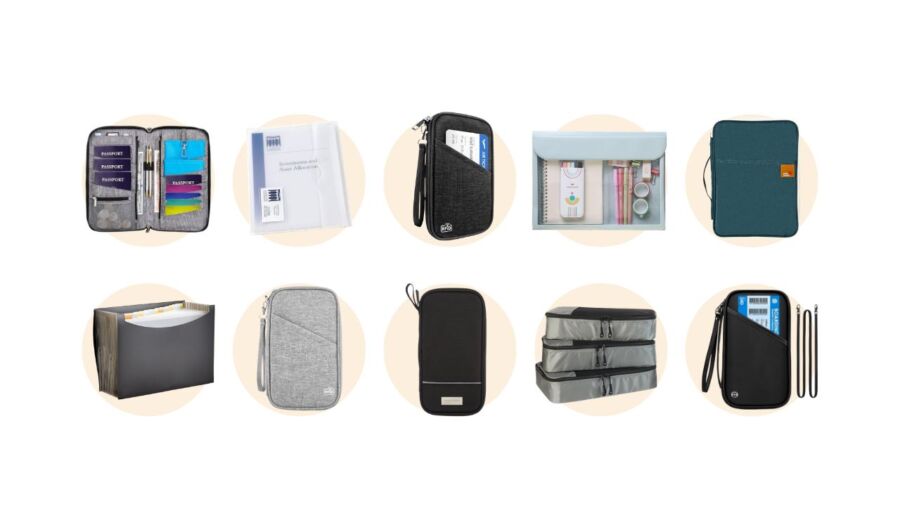
For one traveller, a plain nylon zip pouch around 5 by 9 inches with a rigid back. For a family, a six-slot pouch. For paperwork, a letter-size expanding file. Below is the specification set for ten organizers, taken from each manufacturer’s own listing. Read the table before the write-ups: the differences that matter are size, closure and water protection, and most of the rest is the same pouch in a different colour.
| Product | Type | Stated size (in) | Passports | Material | Water claim | RFID claim |
|---|---|---|---|---|---|---|
| Amazon Basics travel organizer (listed as AmazonBasics) | Single-traveller pouch | 10 x 5 x 1 | 1 to 2 | 100% nylon | None stated | Yes |
| TOPBAG travel organizer | Single-traveller pouch | 9 x 5 x 0.78 | 1 to 2 | Polyester | Water-resistant | Yes |
| HOHOM family organizer | Family pouch | 9 x 5 x 0.78 | 4 to 5 | Polyester | Waterproof | Yes |
| BOACAY travel organizer | Family pouch | 8.9 x 5 x 1.4 | 5 | Polyester | Waterproof | Yes |
| Holifesy family organizer | Family pouch | 10.63 x 5.91 x 1.18 | 6 | Polyester | None stated | Yes |
| P TRAVEL family organizer | Family pouch, lanyard | 9.25 x 5.2 x 0.87 | Multiple | Nylon | Waterproof | Yes |
| El-fmly document holder | Large flat holder | 13.6 x 9.8 x 1.2 | Multiple plus paperwork | Water-resistant polyester | Water-resistant | None stated |
| Amazon Basics expanding file | Letter-size expanding file | 13 x 9.5 x 1.6 | Not designed for passports | Poly, 13 pockets | Listed as waterproof | None stated |
| Mr. Pen travel folder | Letter-size folder | Letter, 8.5 x 11 | No | Plastic or synthetic | None stated | None stated |
| Avery translucent wallet | Letter-size wallet | 11.6 x 9.25 x 0.25 | No | Polypropylene | None stated | None stated |
Two honest notes about that table. First, the water claims are the sellers’ own words, and “waterproof” on a fabric pouch with an exposed zip normally means the fabric resists a splash rather than that the contents survive a soaking. A dry bag is waterproof; a coated polyester pouch is not. Second, the published pocket counts run from six to twenty-one across items of nearly identical outer dimensions, which tells you the counts are drawn differently rather than that one holds three times as much.
Best for one traveller: Amazon Basics nylon travel organizer
A 10 by 5 by 1 inch nylon zip case with eight pockets and a stated RFID-blocking lining, in black only. It is the reference version of this shape: nothing on it is clever, which is why there is little to fail. The trade-off is bulk, since it is deeper than a wallet and will not disappear into trousers. Check the current listing and price.
Best for a couple travelling light: TOPBAG travel organizer
Slightly slimmer than the Amazon Basics case at 0.78 inches deep, with ten pockets, six card slots and a water-resistant polyester shell, listed at 6.38 ounces. The width suits two passports and two boarding passes without the dead space a six-slot family pouch carries. See the listing.
Best for a family of four or more: Holifesy family travel organizer
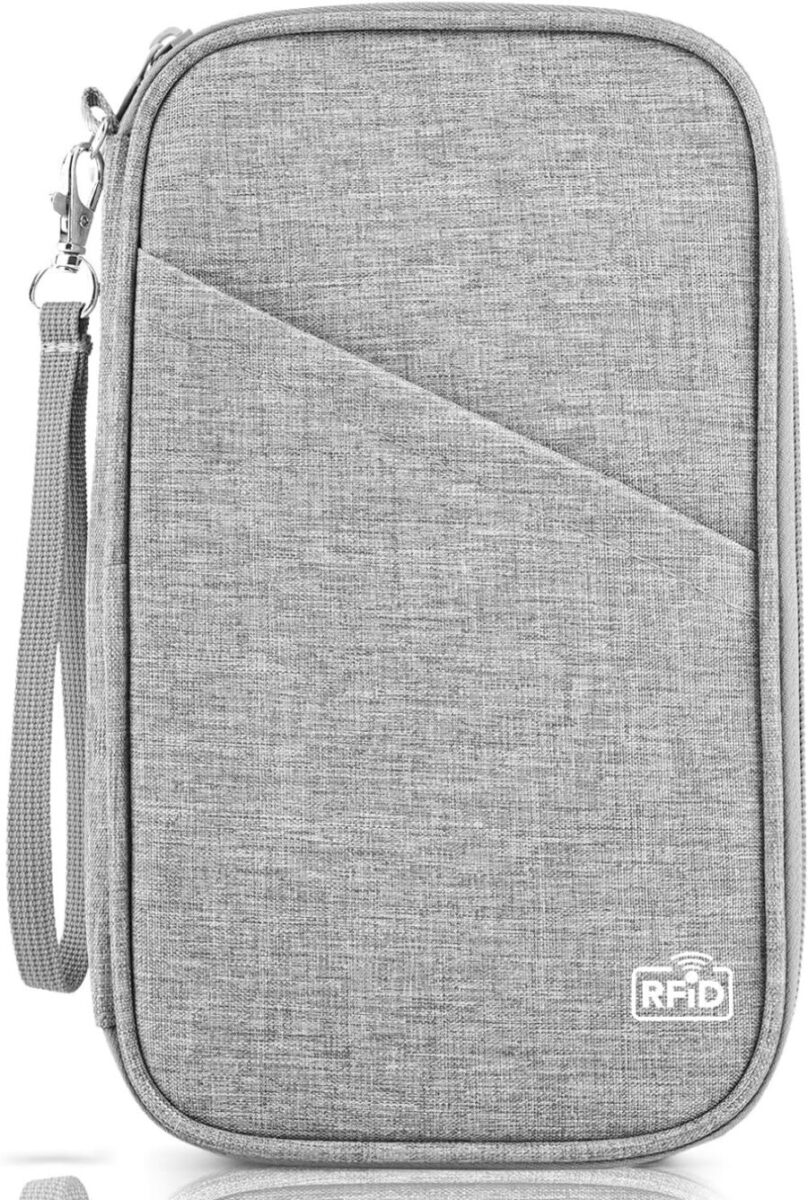
Six passport slots and twenty-one pockets across a 10.63 by 5.91 inch body, at about 0.26 kg. Six slots is the number that matters, because it holds two parents and up to four children without forcing anyone’s passport into a shared sleeve. It is the wrong purchase for one person, where most of the volume travels empty. See the listing.
Best waterproof family option: HOHOM family passport organizer
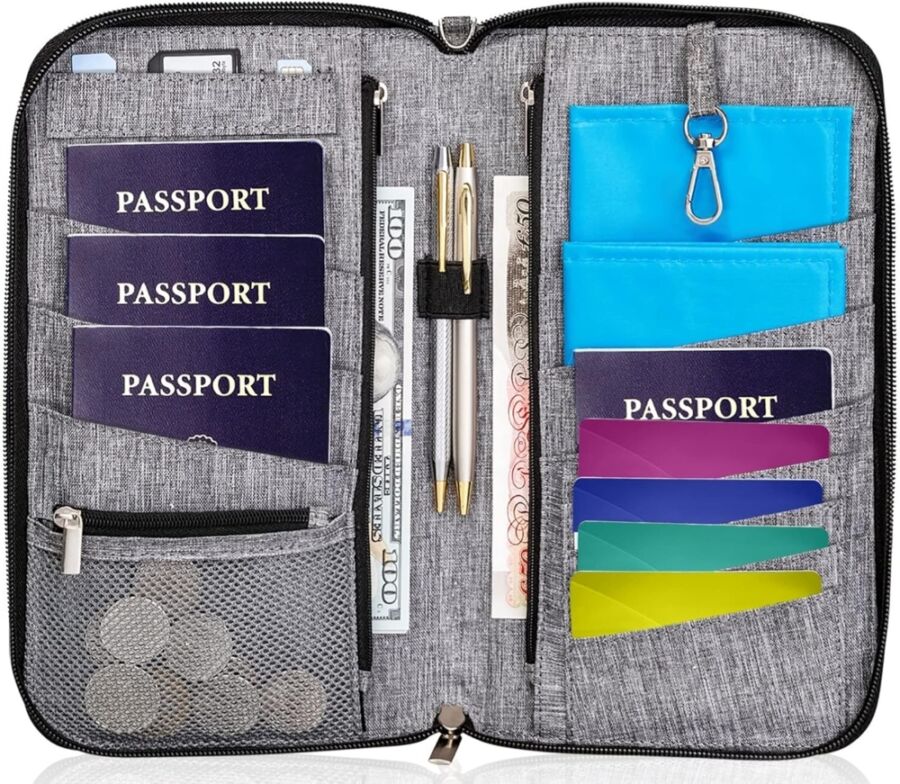
A 9 by 5 by 0.78 inch polyester pouch holding four to five passports at 4.66 ounces, listed as waterproof. Of the family pouches here it is the lightest and the one that states water protection outright, which is the specification worth paying for given the replacement arithmetic above. See the listing.
Also worth knowing: BOACAY and P TRAVEL family pouches
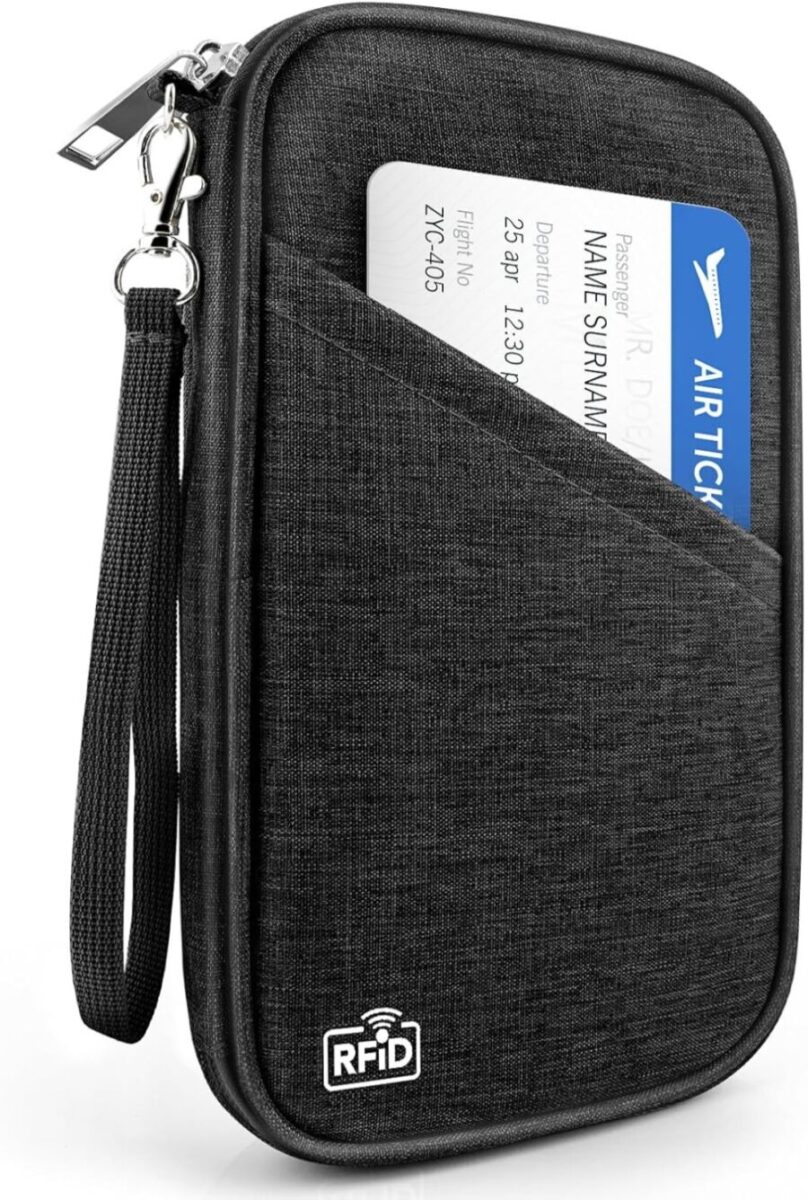
The BOACAY organizer holds five passports in an 8.9 by 5 by 1.4 inch body with a boarding-pass pocket. The P TRAVEL organizer is a 9.25 by 5.2 inch nylon pouch with a lanyard. On the lanyard: run it through the pouch’s own ring and leave the passport inside the pouch. Threading anything through the book is the hole punch the State Department lists as damage. If you want the document on a cord rather than in a pocket, use a purpose-made waterproof lanyard holder that encloses the book instead.
Best for visa paperwork and printed itineraries: Amazon Basics 13-pocket expanding file
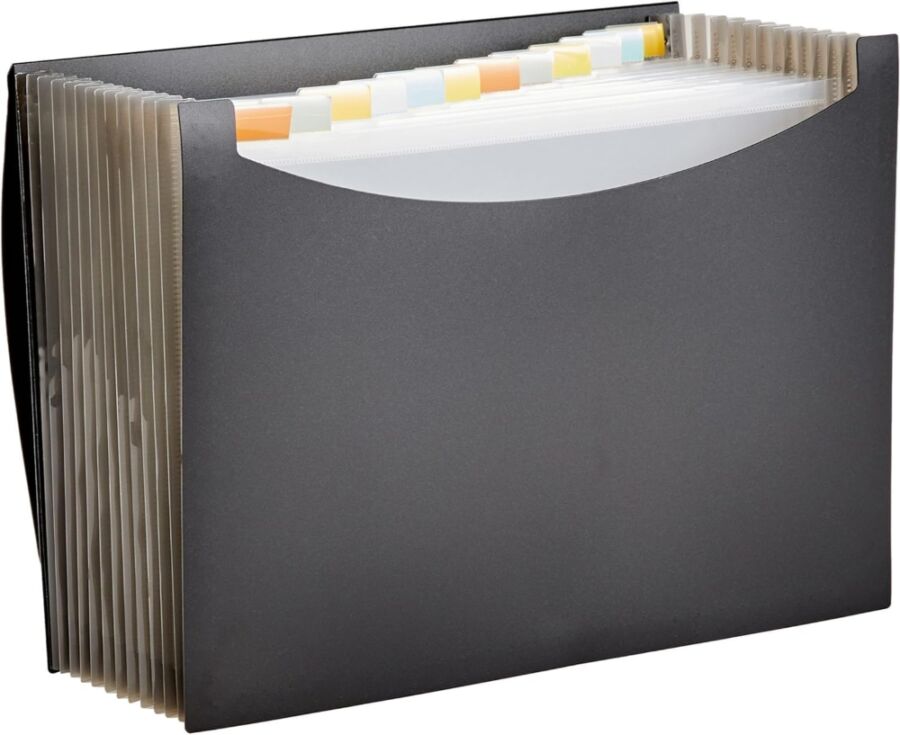
A 13 by 9.5 by 1.6 inch poly expanding file with thirteen pockets, a cord closure and a stated 260-sheet capacity. This is the letter-size product, not a passport item: it holds visa packets, insurance certificates and consent letters flat, which is the whole point. The plastic dividers are the weak part. See the listing.
Slimmest paperwork options: Mr. Pen folder, Avery wallet and the El-fmly holder
The Mr. Pen travel folder is a letter-size folder with a clear front sleeve and a magnetic closure, single pocket. The Avery translucent wallet is thinner still at 0.25 inches and 2.4 ounces, holding about fifty sheets. The El-fmly holder is the one item here that tries to bridge both jobs, at 13.6 by 9.8 inches with ten pockets in water-resistant polyester. It bridges them by being folder-sized, so it solves the paperwork problem and not the pocket problem.
One entry has been removed from the previous version of this guide: a set of Amazon Basics packing cubes. Packing cubes sort clothing. They are not document organizers and had no business in this list.
How much should a travel document organizer cost?
Less than the passport it protects, which is the only price comparison that stays true. Street prices in this category move week to week and vary by colour and seller, so this guide does not publish a figure next to each product: any number here would be wrong within a month. What is stable is what each tier buys you, and what the downside costs.
| Tier | What you get | Indicative band | Worth it when |
|---|---|---|---|
| Single passport sleeve | A cover, one or two card slots, no closure | Under $10 | You want the passport to stay clean in a bag that is already dry |
| Single-traveller zip pouch | Zip closure, rigid back, card slots, pen loop | $10 to $25 | Almost always the right purchase for one person |
| Multi-passport family pouch | Four to six passport slots, boarding pass pocket, lanyard ring | $15 to $35 | Two or more passports travel together |
| Letter-size folder or wallet | Flat storage for 8.5 x 11 in paperwork | $5 to $20 | A visa, insurance or consent-letter trip |
| Expanding file, 13 pockets | Sorted paperwork, cord closure, 260 sheets | $10 to $25 | Relocation, long-stay visas, family records |
| Fireproof accordion file | Heat and water resistance for records at home | $30 to $70 | Home storage. Not for travel |
Against those bands: $165 to replace one damaged adult passport in person, $135 for a child, and none of it refundable. The pouch is roughly one tenth of the cheapest failure it prevents, and that ratio holds whatever the sticker says this week.
How do you organize travel documents for a family?
Use a multi-slot pouch for storage, but split the passports between two adults for carrying. The standard advice, which the previous version of this guide also gave, is to keep the children’s passports with an adult’s in one pouch. That is right about custody and wrong about risk: it turns one lost bag into a whole family missing their flight.
- Sort at home, not at the airport. One slot per person, in the same order every trip, so a missing passport is visible as a gap rather than discovered at a desk.
- Split the carry. Each adult takes their own passport plus one child’s. A family of four then loses at most half its documents to any single incident.
- Keep the paperwork separate from the passports. Visa letters and insurance certificates go in the letter-size folder in the bag. The pouch you hand over at a desk should hold only what that desk needs.
- Photograph every data page and store the images somewhere you can reach without your phone. A copy does not replace a passport, but it shortens every conversation that follows losing one.
- Check validity and blank pages for each person separately. Children’s passports are issued for five years rather than ten, so the child is usually the one who expires first.
For the pouch itself, count slots rather than pockets. A family passport holder sold as a family travel wallet and one sold as a family travel document organizer are usually the same object with different listing copy, so compare the slot count and the shell rather than the name. Six passport slots covers two adults and four children, and it is the specification that decides whether your important travel documents travel in one compartment or two. Read the in-room safe options for where the pouch goes once you have arrived, and the wider travel security kit if theft rather than damage is your main worry.
Which documents do you still need on paper in 2026?
For a domestic U.S. flight, one acceptable physical or mobile ID. For an international trip, the passport itself, plus whatever the destination demands in print. Everything else can be a photograph, and the organizer’s job is to carry the short list well rather than a folder of paper you will never open.
REAL ID enforcement began on 7 May 2025. You need one acceptable ID, not two: a REAL ID-compliant licence, or a passport, or a state-issued Enhanced Driver’s Licence, or a mobile driver’s licence from a state TSA has approved (TSA’s acceptable identification list).
The new part for 2026 is what happens when you have none of those. From 1 February 2026, a traveller who cannot present an acceptable ID at a checkpoint can pay $45 to use TSA ConfirmID, which covers a 10-day travel period. That is a real fallback rather than an automatic denial, and it is also $45 and an identity-verification process you can avoid by putting the ID in the pouch.
| What you have | Accepted? | Cost | Note |
|---|---|---|---|
| REAL ID-compliant licence or ID card | Yes | State DMV fee | One ID is enough. You do not also need a passport |
| U.S. passport book or card | Yes | $130 / $30 to obtain | The usual alternative to a REAL ID |
| Enhanced Driver’s Licence or ID (EDL/EID) | Yes | State fee | Issued by a handful of states |
| Mobile driver’s licence (mDL) | Yes, if the state is TSA-approved | Usually free | Check your state before relying on it |
| None of the above | Via TSA ConfirmID | $45 | From 1 February 2026, covers a 10-day period |
For international travel the constraint is the passport’s remaining validity, and it is not one rule. Some destinations require six months of validity beyond your trip, and some airlines will refuse boarding if that is not met. For the European Union the requirement is validity of at least three months beyond your planned departure from the EU (State Department guidance for U.S. travellers in Europe). Two or more blank pages is the other requirement that catches people, because a full passport is refused entry in some countries even while it remains valid.
| Document | Must be physical | Photo or copy is enough | Why |
|---|---|---|---|
| Passport | Yes | No | The book is the document. A copy only helps you report a loss |
| Acceptable ID for a U.S. checkpoint | Yes, or an approved mDL | No | A photograph of a licence is not an accepted ID |
| Visa in the passport | Yes, it is in the book | No | Nothing to carry separately |
| Visa approval letter or e-visa | Often yes, in print | Sometimes | Several countries still ask for the printed grant at the desk |
| Travel insurance certificate | Usually no | Yes | Some visa applications and border checks want it printed |
| Notarised consent letter, child with one parent | Yes | No | Airlines and border officers ask for the original |
| Hotel and flight confirmations | No | Yes | Print only if a visa or border requires proof of onward travel |
| Vaccination records | Depends on destination | Sometimes | Check the destination requirement, then print if asked |
If you are assembling a visa application rather than a holiday, the visa interview preparation guide covers what the desk expects to see. For the trip itself, the packing checklist and the planning walkthrough cover the order to do things in.
Can you put an AirTag or tracker in a document organizer?
In carry-on baggage, yes, with no restriction worth worrying about. In checked baggage, only within a specific FAA limit: a baggage tracking device is permitted in a checked bag if it does not exceed 0.3 grams of lithium metal or 2.7 watt-hours for lithium ion.
That limit is the number to check, and it is the one no product listing mentions. A coin-cell tracker sits well inside it. A tracker with a rechargeable lithium-ion pack may not, and a power bank certainly does not. Two further conditions apply to anything lithium-powered that you check: the device must be completely switched off, not asleep, and protected against unintentional activation; and spare lithium batteries and power banks may not be checked at all and must travel in the cabin (FAA PackSafe, lithium batteries).
| Item | Carry-on | Checked | Limit or condition |
|---|---|---|---|
| Coin-cell baggage tracker | Yes | Yes | Within 0.3 g lithium metal; switched off and protected |
| Rechargeable lithium-ion tracker | Yes | Only if within the limit | 2.7 Wh maximum for a checked bag tracker |
| Spare lithium coin cells | Yes | No | Spare lithium batteries may not be checked |
| Power bank or portable charger | Yes | No | Carry-on only, without exception |
| Phone or tablet in the bag | Yes | Discouraged | If checked, switch off completely and protect from activation |
Two caveats. International regulations can differ from the U.S. domestic rules, so check with the airline for a foreign carrier. And a tracker tells you where a bag is, not where a passport is: put the tracker in the checked bag and keep the documents on you.
What materials hold up, and is leather worth it?
Coated nylon or polyester, in that order. Leather looks better and protects worse, which is the opposite of what the price suggests.
Almost every travel wallet in this category is polyester or nylon. Nylon is the tougher textile per unit weight and takes a water-repellent coating well, which is why the plainest nylon travel passport wallet tends to outlast a fabric one at the same price. Coating is the part that matters and the part that is rarely specified: a coated shell sheds a splash, and an uncoated one wicks it straight through to the passport inside.
Genuine leather is the wrong material for the job the document holder actually does. It absorbs water, stains permanently, stiffens as it dries and adds weight for no capacity. A leather passport holder is a good-looking cover for a passport that lives in a dry bag, not protection. Vegan leather, sometimes listed as artificial leather or PU, is a coated fabric wearing a leather finish: it resists water better than the real thing and scuffs more easily. If you want the look, buy it for the look and keep a waterproof case for anything that matters.
| Material | Water resistance | Weight | Durability | Best for |
|---|---|---|---|---|
| Coated nylon | Good, if the coating is stated | Lightest | Highest | The default choice |
| Coated polyester | Good | Light | High | Most family pouches on the market |
| Uncoated polyester | Poor, wicks water | Light | Medium | Dry-bag-only use |
| Vegan or artificial leather (PU) | Fair to good | Medium | Scuffs easily | Appearance with some protection |
| Genuine leather | Poor, stains and stiffens | Heaviest | High if kept dry | A cover, not protection |
| Rigid plastic document wallet | Good | Light | Cracks at the fold | Flat paperwork in a bag |
| Leather document holder, padfolio style | Poor | Heavy | High if kept dry | Meetings, not airports |
| Welded dry pouch | Genuine waterproofing | Light | High | Boats, kayaks, monsoon season |
One honest limit: no fabric zip pouch is waterproof in the sense a welded dry bag is, whatever the listing says. The zipper is the opening. If the trip involves a boat, a paddle or a rainy season, put the pouch inside a dry bag and stop worrying about the shell.
Should you use a neck wallet, money belt or crossbody instead?
Use a neck wallet or money belt for the walk between places, and a zippered travel organizer for the documents themselves. They solve different problems and most travellers who try to pick one end up carrying both.
- Neck wallet. A flat pouch on a cord worn under a shirt. Good for a passport and one card during a transit day. Uncomfortable over several hours, and visibly reaching into your shirt at a counter undoes the concealment.
- Money belt. Worn at the waist under clothing, sized for cash, a card and a folded document. The least accessible option, which is the point: it is for what you do not intend to touch until you need it.
- Crossbody pouch. Outside the clothing, reachable, and the practical middle ground for a day of paperwork appointments. Easiest of the three to have taken from you.
- Wrist strap on a travel wallet. Stops the pouch being left on a counter, which is a more common loss than theft.
- Card holder or slim card wallet. A minimalist card holder carried separately from the passport holder for travel spreads the loss, which is the same logic as splitting a family’s passports.
- Zippered travel organizer in an inside pocket. Where the documents should live the rest of the time, including the cards and cash you are not spending that hour.
The one thing that belongs in none of them is a passport with something threaded through it. Whatever you wear, the book stays enclosed. For the theft side of this decision rather than the damage side, the travel hacks guide covers the habits that matter more than the hardware.
What else actually goes in the pouch
Keep it to what a desk will ask for plus what you would hate to lose. A workable set for one traveller: passport, one acceptable physical ID, one credit card and one backup card held apart from your everyday wallet, a small amount of local currency, the SIM card or eSIM details for the destination, a vaccination card if the destination asks for one, and a pen. Cards and cash beyond that belong in a slim wallet you use daily, not in the travel document holder you open at borders. Loose zipper pouches, including the mesh zipper pouch bags sold in packing sets, are fine for cables and chargers and wrong for paper: mesh is not a shell, and a multi-layer pouch with a solid coated face is what keeps travel essentials dry. Good travel organization here means fewer items in the pouch, not more pockets in it.
Can a digital wallet replace the documents in the pouch?
No. TSA is explicit that even where a digital ID is accepted, you must still carry an acceptable physical ID. The phone shortens the checkpoint; it does not empty the pouch.
Digital IDs now work at more than 250 airports through Apple Wallet, Google Wallet and Samsung Wallet or a state-issued app, and TSA lists around twenty-one states and territories issuing mobile driver’s licences its readers accept. An eligible mDL has to be based on a REAL ID-compliant licence or an Enhanced Driver’s Licence in the first place, so the digital copy inherits the physical card’s status rather than replacing it (TSA, participating states and eligible digital IDs).
Nothing about international travel changes either. There is no digital passport for a border crossing: the book is the document. An iPhone or Samsung handset holding a boarding pass and a digital ID is a convenience layered on top of a passport you are still carrying, in something, through an airport. That something is the product this page is about.
What about fireproof and lockable document organizers?
They are a home product that shares a search term with a travel one. A fireproof accordion file is heavy, thick and built to protect birth certificates, deeds and social security cards in a house fire. None of that is a travel requirement, and the weight and bulk are actively wrong for a trip.
Buy one if you want your records survivable at home, and keep it there. If you want your passport survivable in transit, the threat model is water, creasing and loss, which is what a light water-resistant pouch addresses. The one place the two overlap is a long-stay relocation, where the paperwork travels once, in checked baggage, and never comes out at a gate.
The home-storage shelf is its own category and worth naming so you do not buy across it by mistake. A fireproof document bag, a fireproof accordion file organizer, an expanding file folder in letter, A4 or legal size, a plastic document box, a file organizer with lock and a small portable home safe are all office supplies built for secure storage of important documents that stay put. A plain file folder or an envelope does the same job with no protection at all. They share the words “document organizer” with the travel product and share almost nothing else. Buy the office-supplies version for the filing cabinet and the coated pouch for the airport.
Mistakes that cost travellers a trip
- Clipping a lanyard through the passport. A hole punch is on the State Department’s damage list. Use the pouch’s ring.
- Letting a child write in the book. Unofficial markings on the data page count as damage, and a pen in a shared pouch is how it happens.
- Repairing a tear with tape. Altering the document does not restore it, and an airline can still refuse boarding.
- Buying on RFID blocking and ignoring the water claim. The threat the lining addresses is the one your passport already handles twice.
- Putting every family passport in one pouch carried by one adult. Storage and carrying are different decisions.
- Assuming a valid passport is an acceptable passport. Some destinations need six months of validity beyond the trip, the EU needs three beyond departure, and several countries need two blank pages.
- Checking a bag with a power bank in the document folder. Spare lithium batteries and power banks are carry-on only.
Frequently asked questions
What is the best way to keep travel documents organized while travelling?
Separate the documents by when you will need them. Passports, boarding passes and one acceptable ID go in a small water-resistant zip pouch you keep on you. Visa paperwork, insurance certificates and printed confirmations go flat in a letter-size folder in your bag. Photograph every data page so a loss becomes a shorter conversation. The mistake is one big pouch you have to empty at every desk.
Do I need an RFID-blocking passport holder?
Not for a U.S. passport. Since 2006 U.S. e-passports have carried anti-skimming material in the cover, so a closed book cannot be read, and the chip uses Basic Access Control, which means it stays silent until a reader has optically read the printed page inside. A blocking sleeve duplicates the first protection and does nothing about the second. Take the feature if it is free, but do not pay extra for it.
What makes a passport damaged enough to be refused?
The State Department lists stains from a liquid, a significant tear, unofficial markings on the data page, missing or torn-out visa pages, a hole punch and a bite mark. Folded pages and a small bend are normal wear and do not count. Airlines make the boarding decision and tend to be cautious, so borderline damage is still a risk.
How much does it cost to replace a damaged passport?
For an adult, $165: a $130 application fee to the State Department plus a $35 facility acceptance fee, because a damaged passport cannot be renewed by mail or online and must be applied for in person on Form DS-11. A child under 16 is $135. Expedited service adds $60 and one-to-three-day return delivery adds $23.36. Neither the application nor the execution fee is refundable, even if no passport is issued.
Is a travel document folder the same as a passport holder?
No. A passport holder is built around the TD3 passport size of 125 by 88 millimetres and is meant to fit a pocket. A document folder is built around letter or A4 paper for visa packets and certificates and lives in your bag. Folding letter-size paperwork into a passport wallet creases it, and many travellers taking a visa trip genuinely need one of each.
How many passport slots does a family need?
Six covers two adults and up to four children without sharing a sleeve. Count slots rather than advertised pockets, since pocket counts run from six to twenty-one across pouches with nearly identical outer dimensions. Store them together, but split the carrying between two adults so one lost bag does not ground the whole family.
Can I put an AirTag in my checked bag or document organizer?
Yes. FAA PackSafe permits a baggage tracking device in checked baggage if it does not exceed 0.3 grams of lithium metal or 2.7 watt-hours of lithium ion, which a coin-cell tracker is comfortably inside. Anything lithium-powered that you check must be completely switched off and protected from accidental activation, and spare batteries and power banks must travel in the cabin.
What ID do I need for a domestic U.S. flight in 2026?
One acceptable ID: a REAL ID-compliant licence, a passport, an Enhanced Driver’s Licence, or a mobile driver’s licence from a TSA-approved state. You do not need both a REAL ID and a passport. From 1 February 2026, a traveller without an acceptable ID can pay $45 to use TSA ConfirmID, which covers a 10-day travel period.
How this guide was checked
Every rule, fee and limit in this guide comes from the body that sets it, and each is linked at the point it is used. Product dimensions, materials and pocket counts are as published by each seller and have not been measured independently, which is stated in the table caption. Price bands are indicative of the product class rather than quoted from a price list, because street prices in this category change week to week.
- U.S. State Department, Passport Fees (page last updated 19 March 2026) and Passport Services FAQ for what counts as damage.
- U.S. State Department, U.S. Travelers in Europe and the International Travel Checklist for validity and blank-page requirements.
- TSA, Acceptable Identification at the TSA Checkpoint, About TSA ConfirmID and the January 2026 release on the $45 fee.
- FAA PackSafe, Baggage Equipped with Lithium Batteries and Lithium Batteries, for the tracker limits.
- ICAO Doc 9303 for the TD3 passport dimensions.
- Government Executive, 2006 on e-passport cover shielding and Basic Access Control, and ESET summarising UK Finance data on contactless fraud.
Corrections made in this update. The previous version of this guide advised that RFID-blocking material matters more than a zip closure for protecting your information, and listed RFID blocking as a primary buying criterion. Both are wrong for a U.S. passport, for the reasons set out above, and have been replaced. A set of packing cubes has been removed from the product list because packing cubes are not document organizers. Claims of first-hand testing that this site cannot substantiate have been removed throughout, and the specification tables are now labelled as seller-stated.
Last updated 27 September 2026. Fees, ID rules and battery limits were re-checked against the State Department, TSA and FAA pages on that date. Fees and rules change, so check the linked page before you rely on a figure.
Disclosure: this guide contains affiliate links. If you buy through one of them we may earn a commission at no extra cost to you. Product selection here is based on published specifications and the rules set out above, not on commission rates.


