
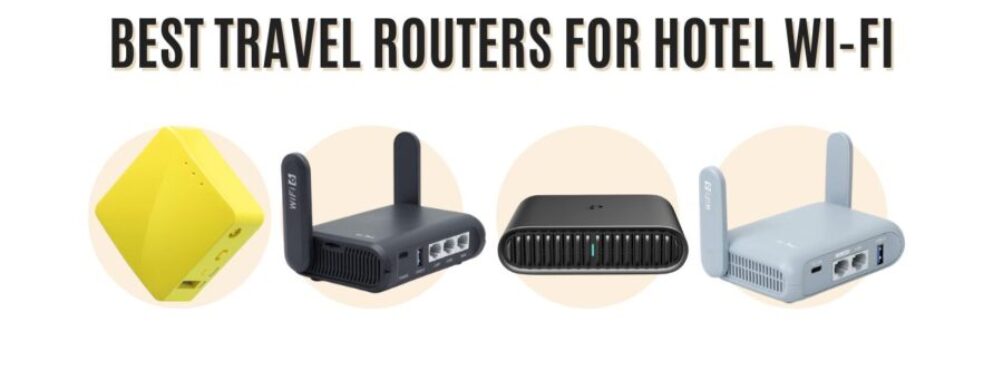
Best Travel Routers for Hotel Wi-Fi: 7 Top Picks to Boost Your Internet Instantly
Updated February 4, 2026
Ever wrestled with terrible hotel Wi-Fi? Maybe you’ve watched that “connecting…” spinner spin for ages or felt uneasy logging into a public network. Travel routers can honestly save your sanity. They turn unreliable hotel Wi-Fi into your own private network, so you can upload photos, stream, or just relax online.
I remember my first solo trip—didn’t even know travel routers existed. I spent half the night squatting by the mini fridge, laptop in hand, just trying to get a single bar of Wi-Fi.
Choosing a travel router isn’t just about grabbing the cheapest one. You want something small enough to toss in your bag, simple to set up when you’re jetlagged, and secure enough to keep your info safe from the sea of devices on the hotel network.
You’ll see routers with fancy extras like built-in VPNs or dual-band Wi-Fi, but honestly? Don’t get distracted by a mile-long features list.
Solid connectivity and real security matter most. If you’re prepping for a trip and already dreading the Wi-Fi struggle, relax—I’ve rounded up the best travel routers that actually work when you’re on the move.
Table of Contents
- Best Travel Routers for Hotel Wi-Fi
- 1. TP-Link Travel AX1500 Wi-Fi 6 Router
- 2. GL.iNet Opal Travel Router
- 3. GL.iNet Beryl AX Travel Router
- 4. Boobowl Travel Router Case
- 5. TP-Link AX3000 Travel Router
- 6. GL.iNet Slate AX Travel Router
- 7. GL.iNet Mango Mini Travel Router
- Buying Guide
- Frequently Asked Questions
- How can I connect a travel router to a hotel Wi-Fi with a captive portal?
- What features should I look for in a travel router to ensure the best connection while abroad?
- Are there any travel routers that offer unlimited data plans for international use?
- Can a travel router provide a secure personal Wi-Fi network in a public hotel setting?
- How do travel routers differ from regular routers in terms of portability and functionality?
- What are the advantages of using a travel router with a built-in SIM card slot?
- Book Your Dream Experience
- More Travel Guides
Best Travel Routers for Hotel Wi-Fi
Finding good Wi-Fi in hotels can be a headache. I’ve had my share of late-night battles with weak signals, just trying to send a quick email.
A solid travel router can spare you the frustration, boosting your signal and giving you a safer connection. If you’re tired of “why won’t this load?” moments, these are the travel routers I’d actually pack.
1. TP-Link Travel AX1500 Wi-Fi 6 Router
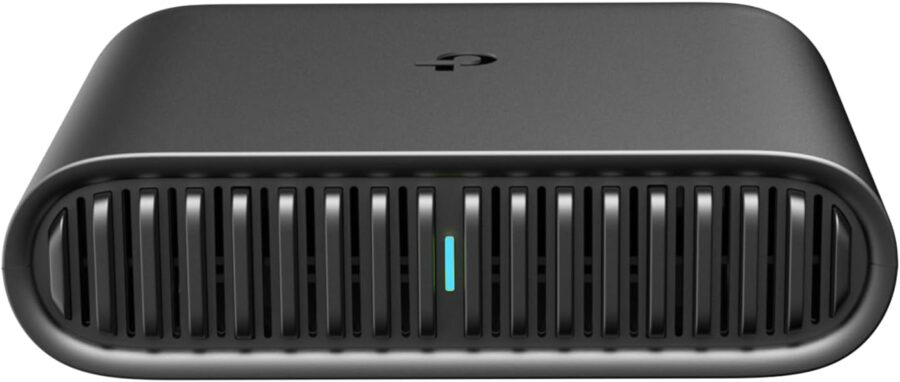
Looking for fast Wi-Fi in your hotel room without lugging around a brick? This pocket-sized TP-Link travel router is a smart pick.
Pros
- Compact—easily fits in your bag or pocket
- Setup is a breeze with the Tether app
- Turns hotel Wi-Fi into your own secure network
Cons
- Needs USB-C power (no built-in battery)
- Doesn’t support OpenWrt or custom firmware
- USB storage sharing isn’t the most intuitive
You’d think something this tiny wouldn’t do much, but the TP-Link Travel AX1500 Wi-Fi 6 Router makes hotel Wi-Fi a lot less of a pain. Plug it in, connect your gadgets, and you’re done—no more logging into the captive portal on every device.
I nearly forgot it in my backpack once because it’s so light, except for the USB-C cable poking out. Starting up is simple, especially with the Tether app. You won’t get lost in endless menus.
One thing I appreciate: you can power it with a USB-C power bank, so you’re not stuck fighting for outlets in a cramped hotel room. Just remember, you’ll need to bring your own power bank.
If you like tinkering with custom firmware, this one isn’t for you. But honestly, most travelers never bother. It covers all the basics—device sharing, internet sharing—so it’s not just a one-note gadget.
2. GL.iNet Opal Travel Router
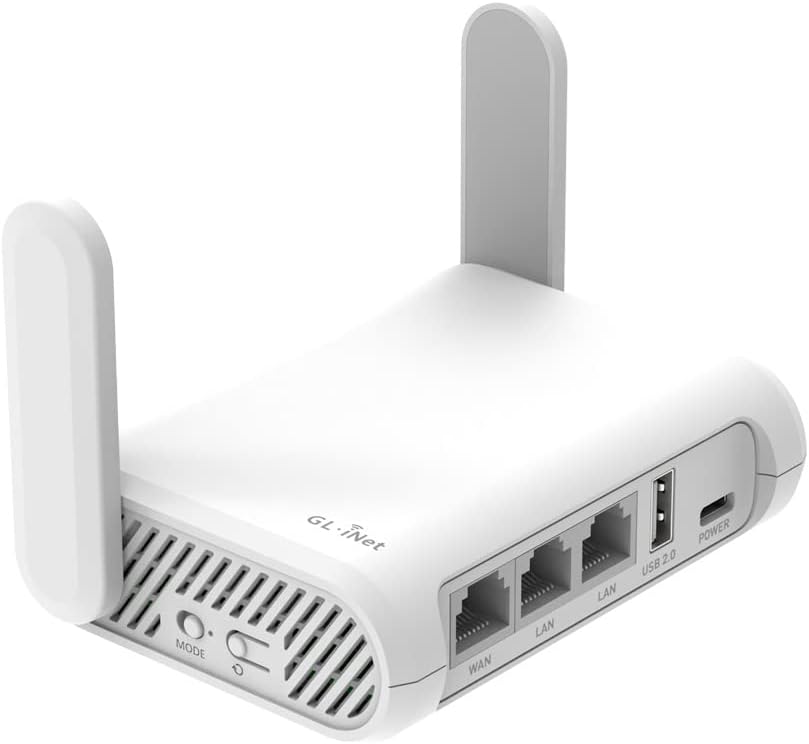
This little router is a solid choice if you want hotel Wi-Fi to feel private and secure, without weighing down your bag.
Pros
- Super compact—easy to pack
- Sets up a private Wi-Fi network in hotels
- Physical VPN switch for quick security
Cons
- Setup instructions can be confusing at first
- Doesn’t support tethering with your phone
- Advanced features require logging in
GL.iNet Opal is about the size of a deck of cards. It’s one of those gadgets you’ll forget until you need it—like when you’re tired of sketchy hotel Wi-Fi.
You can set up your own mini network for your laptop, phone, and whatever else you’re carrying. It’s a relief if you’re worried about who’s on the hotel’s public network.
The physical VPN switch is a standout. You’ll need to set it up before your trip, but it makes security as easy as flipping a button. The extendable antennas help with range, which is handy if your hotel Wi-Fi signal is weak or blocked by thick walls.
Setup isn’t always intuitive if you’re new to mini routers. The instructions aren’t impossible, but you might scratch your head a bit. And if you prefer using your phone’s hotspot instead of hotel Wi-Fi, this model won’t connect via tethering.
But for reliable hotel Wi-Fi with solid security, Opal is a travel companion I’d trust.
See Related: Pack Wisely: Guidelines for Traveling with Tobacco Products
3. GL.iNet Beryl AX Travel Router
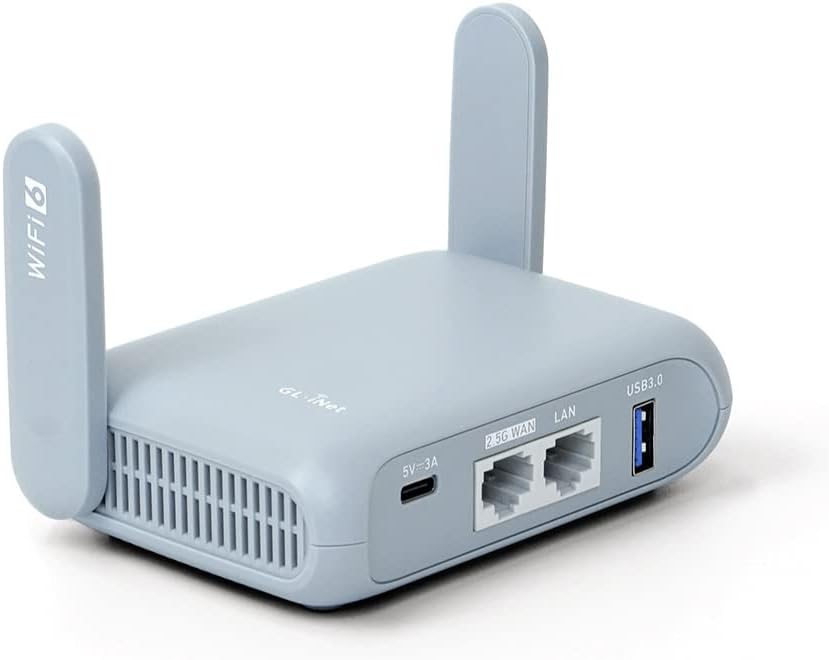
Want a compact travel router that makes hotel Wi-Fi safer and more reliable? This one covers a lot of ground without being overwhelming.
Pros
- Small and travel-friendly, quick setup
- Strong privacy tools like built-in VPN support
- Physical toggle for custom features
Cons
- You need to set up the toggle button beforehand
- Customization can be tricky for beginners
- Requires your own VPN subscription
Hotel Wi-Fi often feels risky and slows to a crawl when everyone’s online. This gadget transforms that shaky network into something private and much more stable.
You don’t need to be a tech wizard to get it running. If you do like tinkering, there’s plenty to play with.
A physical switch lets you toggle features like ad blocking or VPN. You’ll have to assign what the switch does in the router’s menu before it works, which is a small hassle if you’re tired and just want to get online.
Security is front and center here. Open hotel networks can be risky, but with this router, your connection stays encrypted and private. You’ll need your own VPN account for full protection, but that’s pretty standard these days.
If you want a plug-and-play solution, you might want to skim the instructions first. Once you’ve used it a couple of times, it becomes second nature. Most travelers won’t care about advanced plugins, so you can skip the geeky stuff and just enjoy faster, safer Wi-Fi wherever you end up.
4. Boobowl Travel Router Case

If you want a sturdy, travel-friendly way to keep your router and accessories together, this case makes it simple.
Pros
- Keeps router and cords organized
- Tough enough for bumps and splashes
- Easy to toss in your bag
Cons
- Just a case—you’ll need your own router
- Might be tight if you’ve got bulky accessories
- Only comes in basic black
Loose tech gear and cords get annoying fast when you travel. The Boobowl case was made for the Solis 5G router, but you can fit any similar-sized hotspot.
There’s a mesh pocket for your charging cable and a sturdy zipper that stays shut—just don’t overstuff it.
The case feels solid enough to handle backpack bumps or a little chaos in the hotel room. Inside, there’s some padding, almost like bubble wrap, for extra shock resistance. An elastic strap keeps your router from sliding around.
The carabiner clip is a small but surprisingly handy detail. Clip it to your bag or a hook, and you won’t have to dig through your carry-on for your router. The color options are basic, but it does the job—keeps your device safe and easy to find, so you can actually relax instead of rummaging for lost parts. If you just need a case and already have your router, you’re set.
See Related: Vacation Packing Tips: Essential Travel Checklist for Stress-Free Packing
5. TP-Link AX3000 Travel Router

If you want a travel router that actually delivers Wi-Fi 6 and keeps you safer on sketchy networks, this one’s a contender.
Pros
- Slips into your pocket or bag—seriously, it’s tiny (see for yourself)
- Lets you run VPNs and beefs up your security on public hotel Wi-Fi
- Can switch modes: router, repeater, whatever you need
Cons
- Setup’s not exactly plug-and-play if you hate tech tinkering
- Not the cheapest out there
- Needs USB power, so you’ll want a power bank or outlet nearby
The AX3000 Travel Router brings Wi-Fi 6 to your hotel room or Airbnb. I love how it turns a dodgy public network into your own private hotspot, and it’s honestly nice not having to share bandwidth with the entire floor.
You get options for how you connect—Ethernet, your phone’s hotspot, or just piggybacking off public Wi-Fi. It adapts to whatever’s available, which is great since you never really know what you’ll find on the road.
I’m a fan of travel gadgets that pull double duty, and this one’s a multitasker: router, repeater, access point. With OpenVPN and WireGuard, you can keep your data locked down even on the sketchiest hotel networks.
Setup can take a little patience. Maybe do it at home the first time, with a snack handy, so you’re not cursing in a hotel lobby. Once you’re up, though, the mobile controls are straightforward and you can even set up parental controls if you’re traveling with kids.
If you bounce between hotels, conferences, or even cruise cabins, this tiny box could sneak its way into your “never leave home without it” list. I’d call it a quiet game-changer for anyone who works remotely on the go.
6. GL.iNet Slate AX Travel Router

The GL.iNet Slate AX is a solid pick if you want a compact router that boosts hotel Wi-Fi security and reliability without much hassle.
Pros
- So small you’ll forget it’s in your bag
- Built-in VPN options for extra privacy
- Lets you share files easily within your own network
Cons
- You’ve got to set up the physical button before it does anything useful
- Feels a bit plasticky and basic
- Gets a little warm if you run it all day
Let’s be honest, hotel Wi-Fi is usually a mess. The Slate AX lets you sidestep the mess by bringing your own network. If you’re tired of fighting for bandwidth with everyone else, this router is a lifesaver.
Privacy tools are built right in. You can easily enable VPN support, which is a breath of fresh air if you worry about random snoops on public networks. It’s also a huge help if you travel with a stack of devices—laptop, tablet, Switch, maybe a Chromecast—since you can keep everything connected behind one shield.
The toggle button doesn’t do much out of the box, so you’ll need to poke around in the settings if you want it to actually help. The plastic housing isn’t exactly premium, so I’d avoid tossing it in a bag with heavy gear. And yeah, it can get toasty if you leave it plugged in for hours—give it some space.
If you care more about privacy and keeping all your gadgets online than you do about having a fancy-looking device, the Slate AX is an easy pick for frequent travelers.
7. GL.iNet Mango Mini Travel Router

If you want a tiny router for turning hotel Wi-Fi into your own private, safer network, the Mango is a clever little solution.
Pros
- Ridiculously compact and easy to stash anywhere
- Secures hotel Wi-Fi fast
- Works with most VPNs for privacy
Cons
- Only single-band, so speeds aren’t amazing
- Needs USB power
- Not great for heavy downloads
The Mango earns its “mini” label. If you’re hopping between hotels and sick of logging in all your gadgets every night, this thing will save you hassle. Just plug it into a USB port—laptop, power bank, whatever’s handy—and it quietly does its job.
The web setup panel makes it simple to create your own private bubble, and you can tweak settings if you’re the fiddly type. I know a few backpackers who swear by it for streaming when hotel Wi-Fi slows to a crawl. VPN support is a bonus if you care about privacy.
It’s not built for speed demons or big file transfers. You only get 2.4GHz, so in packed hotels, things might slow down. But for email, browsing, and keeping your devices off public networks, the Mango is a no-drama fix.
See Related: Game-Changing Travel Products for Easy Packing
Buying Guide

Let’s face it, hotel Wi-Fi is usually awful. If you’re shopping for a travel router, you probably know the pain. Here’s what I actually look for—beyond the marketing fluff.
First, size matters. If you’re like me, you’ll want something small and light that actually fits in your bag. Big routers are dead weight on the road. But don’t just go by looks—make sure it has enough range for a hotel room.
Speed and compatibility are huge. If you stream or work on the go, you can’t afford to lag out. Look for dual-band (2.4GHz and 5GHz) so you have options, especially when hotel Wi-Fi gets crowded.
Reliability is non-negotiable. I can’t stand routers that drop connections every hour. Some let you plug straight into the hotel’s ethernet—if that’s available, it’s almost always faster than the Wi-Fi.
Here’s a quick table to help you spot what really matters:
| Feature | Why It Matters | My Experience |
|---|---|---|
| Size | Easy to pack | Heavy gear slows you down! |
| Dual-Band | Better for streaming/video | Avoids lag on video calls |
| Ethernet Port | Backup for bad Wi-Fi | Lifesaver when signals drop |
| Security | Keeps data safe | Stops random popups and weird ads |
Don’t skip the security features. Routers with easy VPN or firewall options keep your data safer, especially on public networks. Not every device protects you equally, so poke around in the settings before you buy.
Battery-powered models are rare, but if you’re headed somewhere with few outlets, it’s worth thinking about. I’ve absolutely forgotten my charger more than once, so having a backup plan is smart.
Frequently Asked Questions

Travel routers can get confusing, especially when hotel Wi-Fi acts up or you’re bouncing between countries. I get a lot of questions, so here’s what actually matters if you want secure internet without the headaches.
How can I connect a travel router to a hotel Wi-Fi with a captive portal?
Most travel routers let you use “Wi-Fi as WAN” or “Repeater” mode. You connect your laptop or phone to the router first, then log in through the captive portal just like you would normally.
Some hotels make life difficult and you might need to clone your device’s MAC address on the router. If you get stuck, try rebooting everything—sometimes that’s all it takes.
What features should I look for in a travel router to ensure the best connection while abroad?
You want dual-band Wi-Fi (2.4GHz and 5GHz) for a stable connection, especially in busy hotels. Go for something small and light—no one wants to lug a brick.
A USB port for charging or sharing files is handy. Extra points if you get guest networking and strong encryption like WPA3.
Are there any travel routers that offer unlimited data plans for international use?
Travel routers themselves don’t usually include data plans. If you grab one with a SIM card slot, you can use a local or global SIM card.
Unlimited data is rare and pricey for true international use. I haven’t found a truly unlimited option that doesn’t slow you down after a certain point.
Can a travel router provide a secure personal Wi-Fi network in a public hotel setting?
Absolutely. That’s one of the best reasons to bring your own router. Your data stays behind your own firewall, so other guests can’t snoop.
Turn on WPA3 or WPA2 encryption for extra protection. I always use a VPN too, just to be safe—hotel networks aren’t exactly trustworthy.
How do travel routers differ from regular routers in terms of portability and functionality?
Travel routers are much smaller and handle weird hotel or airport Wi-Fi setups better. They usually skip the extra ports and fancy features you’d find on a home router, but they’ll fit in your palm or even a jacket pocket. You lose a bit of performance, but when you’re living out of a suitcase, saving space is worth it.
What are the advantages of using a travel router with a built-in SIM card slot?
With a SIM card slot, you can hop online pretty much anywhere there’s cell signal. No more wandering around searching for sketchy Wi-Fi in hotel lobbies or trying to squeeze into a packed café just for a password.
Last year, I brought one along for a train ride across Portugal. Let me tell you, uploading photos or grabbing maps mid-journey felt incredibly freeing—no more waiting for the next Wi-Fi hotspot.
You can grab a local data SIM and skip those outrageous roaming fees. It’s especially handy if you’re bouncing between countries or just love spontaneous side trips. Honestly, if you value staying connected on your own terms, this little gadget’s a must.
Book Your Dream Experience
More Travel Guides
Related Posts